 Minecraft Launcher
To install Adrenaline or Additive on the Minecraft launcher, you can use the Additive installer.
Can't open? Try running java -jar additive-installer-1.1.0.jar in a terminal. You need Java.
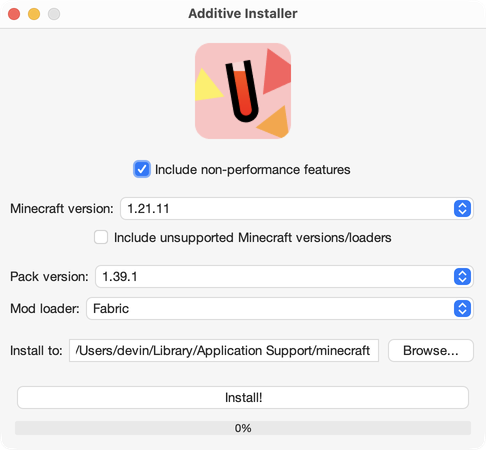

Minecraft Launcher
To install Adrenaline or Additive on the Minecraft launcher, you can use the Additive installer.
Can't open? Try running java -jar additive-installer-1.1.0.jar in a terminal. You need Java.


 Prism Launcher, Modrinth App, etc
To install Adrenaline or Additive on third-party launchers, read Modrinth's documentation.
This is the recommended installation method if you plan on managing extra mods alongside Adrenaline or Additive.
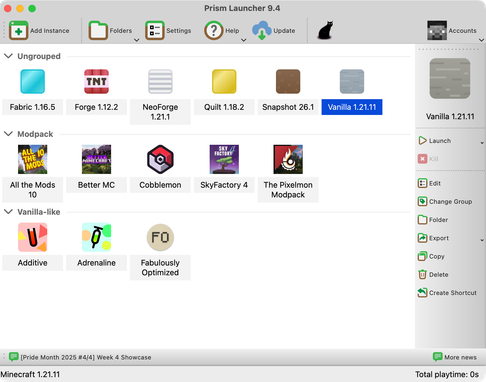
Using a Steam Deck? You can install Adrenaline on there! This may also work similarly on other handhelds, but I haven’t tested. First we’ll install Prism Launcher, and then install the modpack.
X to open the keyboard.Prism is now installed. Now, we can install the pack.
STEAM + X together to open the keyboard. Then, search for “Adrenaline”.Adrenaline also optionally functions server-side! We now use Modrinth’s mrpack environment feature to install the proper mods for the correct environment. Client-side mods that are part of Adrenaline will not be installed through these methods. The server portion of this modpack was previously known as Adrenaserver.
Download mrpack-install through GitHub releases (or your distro’s package if it has one) and take a look at the commands on the README. In Adrenaline’s case, to install in your server you would run:
mrpack-install adrenaline [optional version number]It’s a good idea to have some knowledge on using Docker before doing this.
docker-compose.yml. This Compose file also contains some other server tweaks meant for performance, such as disabling sync-chunk-writes, reducing render and simulation distance, and moredocker compose up -d in that directoryFor any other information, you can read through the Docker Minecraft Server documentation.
services: mc: image: itzg/minecraft-server tty: true stdin_open: true ports: - "25565:25565" environment: EULA: "TRUE" # Adrenaline and other mods MOD_PLATFORM: MODRINTH MODRINTH_DOWNLOAD_DEPENDENCIES: required MODRINTH_MODPACK: adrenaline # this installs the latest version of Adrenaline, you can also use a specific MR link to a version MODRINTH_PROJECTS: spark, chunky # comma separated list of extra mods # Server properties VIEW_DISTANCE: 8 SIMULATION_DISTANCE: 5 SYNC_CHUNK_WRITES: false # having this set to false will significantly improve performance but may cause desync issues and (extremely rare) data corruption. set to true if you don't have a backup system volumes: # Attach the relative directory 'data' to the container's /data path - ./data:/datamcman is a tool for managing the mods/plugins/configurations of a Minecraft server. First, install mcman from releases. To import Adrenaline while initializing a server, use this command:
mcman init --mrpack mr:adrenalineAfter initializing and importing the mrpack, run mcman build to build the server into the server/ directory, from which you can call cd server && sh start.sh or cd server && call start.bat. For more information, check out mcman’s docs.
See the mrpack4server Git repository for installation info. modpack-info.json:
{ "project_id": "adrenaline", "version_id": "version id or name"}Before doing any of this, be sure to have a backup of the server in case anything goes wrong.
packwiz-installer is a useful tool that lets you automatically install and update a modpack through the pack.toml file of that pack.
Some server hosts may let you set a command that runs before the server actually starts. It’s called a pre-launch command. I can’t exactly help if you are using an external server provider as many don’t support pre-launch commands or require you to supply your own jar file that will run the command.
First, you need to install packwiz-installer-bootstrap from here. After that, move it to the same folder as your server’s Fabric loader jar. This will usually be the root of the server.
You may change the MC version of the modpack (available versions only).
java -jar packwiz-installer-bootstrap.jar -g -s server https://raw.githack.com/skywardmc/adrenaline/dist/versions/fabric/1.21.1/pack.tomlIf you are running this server through a batch file or shell script, you can add this command before your server’s launch command and it should work just fine.
Having trouble? Check out the packwiz wiki and, if that doesn’t help, ask in the packwiz Discord server.
If you would like to improve performance even more, after installation, see post-install.